Shadowfetch Review
Shadowfetch Linux 2.1.5: A Debian Testing Creative Workstation With Local AI Baked In
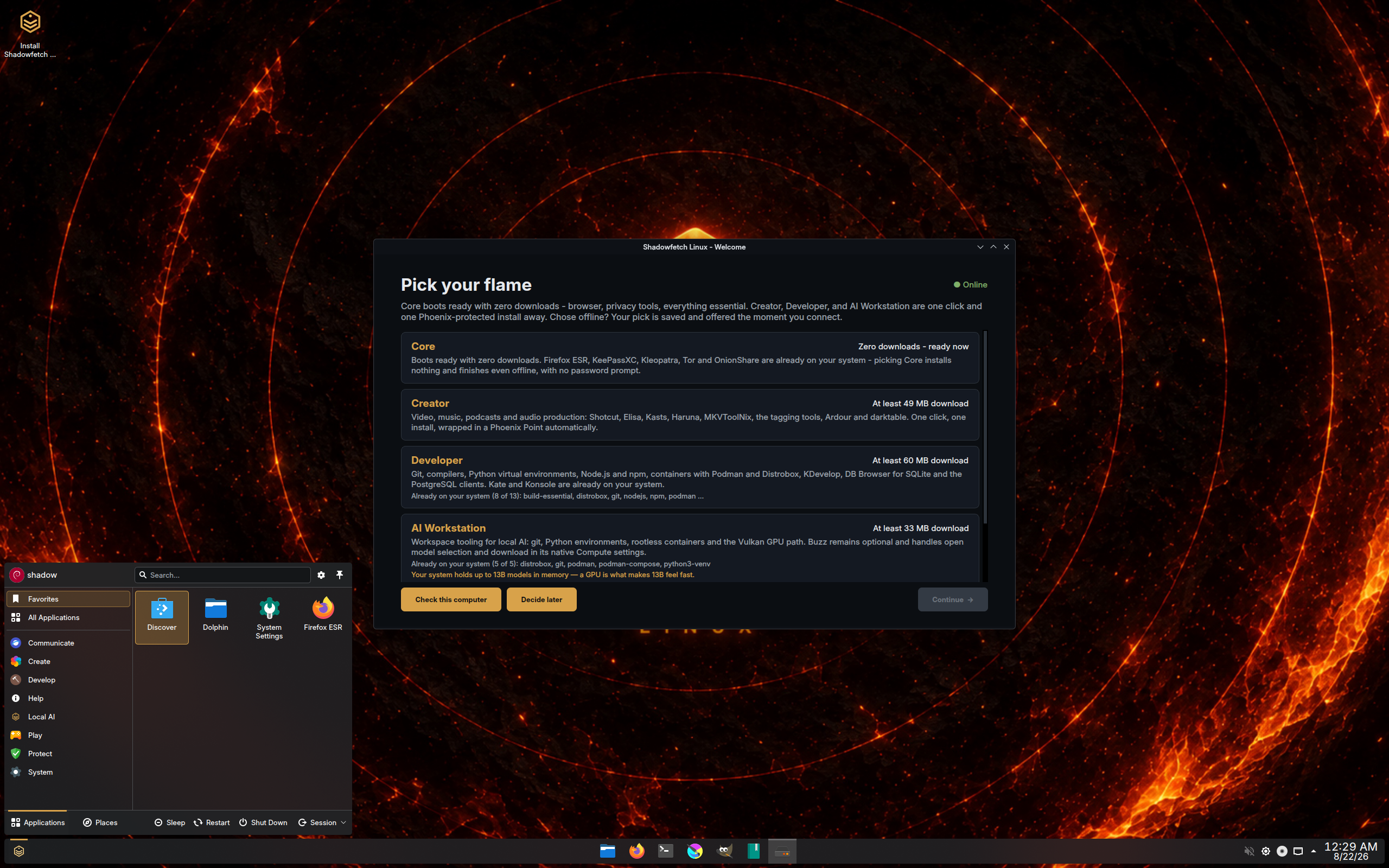
Most distributions start with a desktop and leave you to build the workstation. Shadowfetch Linux starts with the workstation. According to its DistroWatch listing, Shadowfetch Linux is a desktop Linux distribution based on Debian’s “Testing” branch and featuring a customised KDE Plasma desktop. The distribution intends to be a “creative workstation”, with several software applications for creative work installed by default — and it adds local artificial intelligence tools and privacy-enhancing features on top of that brief.
The edition shown in the listing’s featured screenshot is shadowfetch-2.1.5-kde, following the Shadowfetch Linux 2.0.0 release announcement recorded by DistroWatch on 24 July 2026, and the listing itself was last updated on 1 October 2026. It is free, listed as Active, and categorised by DistroWatch as a Desktop, Live Medium and Privacy distribution. It currently sits at number 110 in DistroWatch’s popularity rankings with 127 hits per day, and visitors rate it 8.8 out of 10 from 4 reviews — a small sample, but an enthusiastic one.
Its base is the first thing to understand. DistroWatch lists Shadowfetch as based on Debian (Testing), originating in the USA and built for x86_64 hardware. That Testing foundation is a deliberate contrast with our Debian review, where the Stable branch is the whole point: Shadowfetch trades some of that conservatism for newer software, while keeping the Debian family mechanics underneath.
At a Glance
| Latest Release | 2.1.5 (featured screenshot edition on the listing) |
| Base | Debian (Testing) |
| Origin | USA |
| Desktops | KDE Plasma (customised) |
| Architectures | x86_64 |
| Installer | Calamares (live ISO, approx. 3,800–3,900 MB) |
| Package Management | APT — deb and Flatpak formats |
| Release Model | Semi-Rolling |
| Init System | systemd |
| File Systems | Btrfs, ext4 |
| Default Browser | Firefox ESR |
| Price | Free |
| DistroWatch Popularity | 110 (127 hits per day) |
| Visitor Rating | 8.8/10 from 4 reviews |
A Creative Workstation, Not a Blank Desktop
The phrase DistroWatch uses is “creative workstation”, and the listing backs it with specifics: several software applications for creative work are installed by default, rather than left for the user to hunt down. The release table lists LibreOffice as the office suite, and the tracked package list includes creative staples such as Krita and GIMP alongside VLC — the toolkit is part of the download, which at roughly 3,800 to 3,900 MB is sized like a system that arrives ready to work.
That ready-made approach will be familiar to readers of our AV Linux review, another Debian-family system built around creative production. The two aim at different benches — AV Linux around audio and video studios, Shadowfetch around a broader creative desk with AI in the mix — but both reject the idea that a distribution should be an empty room you furnish yourself.
AWS Alternative - Digital Ocean
Local AI Tools, On Your Own Hardware
The most distinctive line in the DistroWatch description is that Shadowfetch Linux also includes local artificial intelligence tools. Local is the operative word: the AI story here is about tools that run on your own machine rather than a subscription service in someone else’s data centre, which fits both the creative-workstation brief and the privacy category DistroWatch assigns to the distribution.
Visitor reviews published on the listing fill in how that plays out in practice. One reviewer describes the concept as combining KDE Plasma, local AI, creative tools, Ollama and agent frameworks into one desktop, and reports that once configured, Ollama ran locally and KDE remained responsive — while also warning that the setup took manual work on their hardware and calling the system “AI-ready, but not turnkey”. Another reviewer, rating it 10 out of 10, praises exactly the opposite experience: a simple start-up with many options, and Debian as a daily driver with the extras baked in. Taken together, the listing’s own reviews suggest real potential with an early-adopter edge, rather than a polished appliance.
Privacy Hardening as a Default, Not an Extra
DistroWatch places Shadowfetch in its Privacy category, and the description names the measures: a UFW firewall, MAC-address randomisation and hardened sysctl attributes. None of those is exotic on its own — what matters is that they are presented as part of the distribution itself, switched on as part of its identity rather than left as a weekend hardening project for the user.
US Mobile | Plans As Low As $10, Get $30 Instantly
That stance pairs naturally with the choice of a customised KDE Plasma desktop. Plasma is also the desktop behind our Kubuntu review, but where Kubuntu keeps close to a conventional Ubuntu-family experience, Shadowfetch customises Plasma around its creative and privacy brief. Firefox ESR as the default browser, per the release table, continues the same theme of favouring the extended-support option.
Debian Testing Underneath: Semi-Rolling, APT, Calamares
Under the customisation, the mechanics are reassuringly familiar. DistroWatch’s release table lists a semi-rolling release model, APT package management in deb format with Flatpak also supported, systemd as the init system, Btrfs and ext4 journaled file systems, and Calamares as the installer. The listing’s current package table is recent, too, tracking a Linux kernel at 7.2.10, Plasma desktop at 6.8.0, systemd at 262 and LibreOffice at 26.8.1 — the kind of versions a Testing base is chosen for.
It is also a live medium, per DistroWatch’s categories, so the system can be tried before it is installed through Calamares. Support resources are linked from the listing’s summary: the home page and documentation are at shadowfetchlinux.org, and the bug tracker is the project’s GitHub issues page. If you prefer your Debian base in a more traditional, general-purpose form, our MX Linux review covers another long-running take on it — Shadowfetch is the more experimental branch of that family tree.
Who Should Try Shadowfetch Linux?
- Creative users who want tools preinstalled — DistroWatch describes a “creative workstation” with several applications for creative work installed by default, plus LibreOffice as the office suite.
- Local AI enthusiasts — the listing highlights local artificial intelligence tools, and visitor reviews describe Ollama and agent frameworks running on the user’s own hardware.
- Privacy-conscious desktop users — a UFW firewall, MAC-address randomisation and hardened sysctl attributes are built into the distribution’s pitch, per DistroWatch.
- Debian users who want newer software — a Debian (Testing) base with a semi-rolling model and current package versions, instead of the Stable branch’s slower cadence.
- KDE Plasma fans wanting something less conventional — a customised Plasma desktop shaped around creative work, quite unlike a stock Plasma install.
Final Thoughts
Shadowfetch Linux has a clear, unusual pitch: take Debian Testing, customise KDE Plasma, preinstall a creative toolkit, add local AI tools, and harden the privacy defaults. A DistroWatch rank of 110 and an 8.8/10 visitor rating from a handful of reviews mark it as a small project with a genuinely pleased early audience — and the listing’s reviews are honest that the AI side can still ask for hands-on setup. If a Debian-based workstation with AI on your own hardware sounds like your desk, Shadowfetch 2.1.5 is well worth a live session.
Source: DistroWatch’s Shadowfetch Linux listing, covering the Shadowfetch Linux 2.1.5 edition shown on the listing and the 2.0.0 release announcement of 24 July 2026.