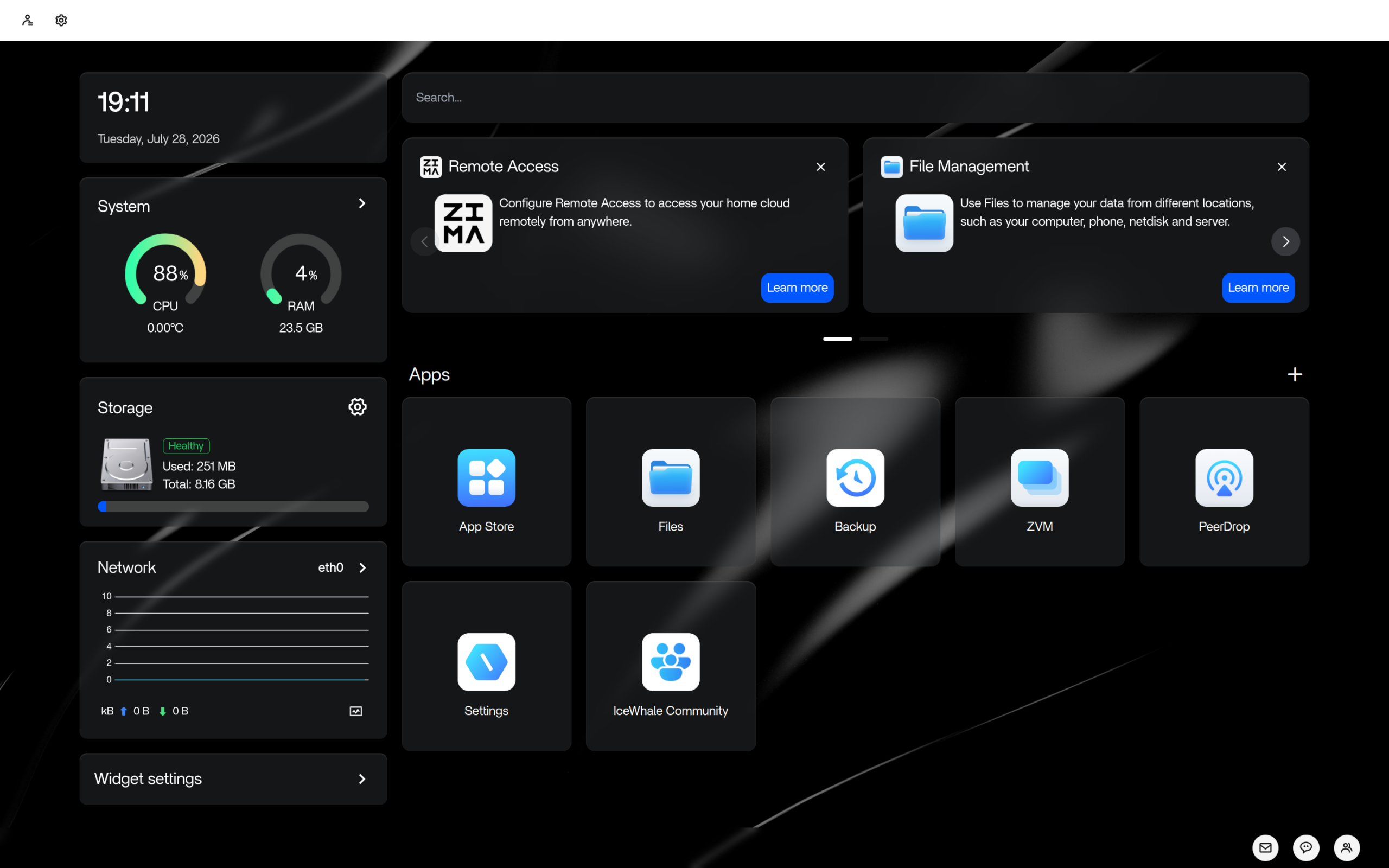
ZimaOS Review
ZimaOS 1.7.0: A Browser-Driven Linux OS for Your Home NAS
Want a personal cloud, a home media server, or a tidy NAS box without touching a terminal? ZimaOS, an independently-developed Linux operating system built specifically for personal servers and network-attached storage, manages the whole machine from a browser window — remote access, RAID storage, and over-the-air updates included.
Most of the Linux distributions reviewed on this site are desktop operating systems: you install them, log in, and open apps. ZimaOS is something different. As its DistroWatch listing describes it, ZimaOS is “an independently-developed, Linux-based operating system for personal servers and network-attached storage (NAS) devices.” There is no desktop at all — DistroWatch lists its desktop simply as “No Desktop, WebUI” — because the idea is that you tuck the machine into a corner, never plug in a monitor, and manage everything through a web interface. If you are after a conventional desktop instead, start with our Linux Mint review for the friendly end of that world.
The project is developed in China by IceWhale Technology Limited, which also produces and sells specialist storage hardware devices called ZimaCube. Besides the full, standalone ZimaOS, the company also produces CasaOS, a lightweight software layer that installs on top of an existing Linux system to turn it into a personal server or NAS. In other words, if you like the concept but already have a server running, say, our Alpine review — a distribution that itself does quiet duty on many home servers — CasaOS is the sibling product built for exactly that scenario.
The latest release listed on DistroWatch is ZimaOS 1.7.0, announced on July 28, 2026, following 1.6.0 from April and 1.5.0 from September 2025. The listing files it under the Server and NAS categories, marks its status as Active, and records a six-month popularity rank of 35 with about 300 hits per day. Visitors rate it 7.8 out of 10 across five reviews — a respectable showing for a specialist distribution that sits far from the mainstream desktop charts.
At a Glance
| Detail | ZimaOS 1.7.0 |
|---|---|
| Release date | July 28, 2026 |
| OS type | Linux |
| Based on | Independent |
| Origin | China (IceWhale Technology Limited) |
| Desktop | None — managed through a WebUI |
| Category | Server, NAS |
| Architecture | x86_64 |
| Release model | Fixed, with over-the-air (OTA) updates |
| Notable features | Remote access, RAID configuration, browser-based server management |
| Status | Active |
| Cost | Free (downloads hosted on GitHub) |
| DistroWatch popularity | #35, about 300 hits per day |
| Visitor rating | 7.8/10 from 5 reviews |
Details above are based on the DistroWatch ZimaOS listing for release 1.7.0.
A Server OS With No Desktop, and That’s the Point
ZimaOS being “Based on: Independent” is worth dwelling on. It is not a respin of Debian or Ubuntu with a NAS dashboard bolted on — it is its own build, maintained by IceWhale, with its own release rhythm. For a server that holds your files, that independence cuts both ways: updates and bug fixes come from one accountable team rather than a chain of upstream projects, but you are also trusting that team’s capacity to keep the base system patched.
The management model is the entire pitch. The DistroWatch description highlights “system-level support for remote access, RAID configuration, over-the-air (OTA) updates, and a browser-based user interface for managing the server.” Install it on an old desktop or a compact box, and it becomes a headless appliance: disks pooled into RAID from the web UI, software refreshed over the air, and the whole thing reachable remotely when you are away from home. This is the same appliance philosophy that made purpose-built systems like SteamOS in our SteamOS review successful on consoles — hide the operating system entirely and let the machine do its one job well.
Remote Access and OTA Updates as First-Class Citizens
On a traditional server distribution, remote access means SSH keys, and updates mean a package manager you run by hand. ZimaOS treats both as product features instead. Remote access works at the system level — you can administer your box from outside your home network through the web interface — and updates arrive over the air, the way they do on phones and routers, rather than through a terminal upgrade ritual.
That design choice reveals the intended audience: people who want the benefits of self-hosting (their files stay on their own hardware) without the administrator’s lifestyle. You do not need to know what RAID 1 or a journaling filesystem is to get your data protected; you pick the configuration in a browser tab and ZimaOS handles it.
IceWhale’s Two-Lane Approach: ZimaOS and CasaOS
One of the more interesting details on the DistroWatch listing is that IceWhale ships two products for the same need. ZimaOS is the complete, standalone operating system — the one you would install on dedicated hardware or on the company’s own ZimaCube storage devices. CasaOS, by contrast, is a lightweight layer that goes on top of an existing Linux installation to give it the same personal-server character.
Get An Easy Personal Loan At Sofi
That split is practical. If you have a spare machine and want a dedicated NAS, ZimaOS replaces whatever is on it with an appliance-style system. If your home server already earns its keep — running a desktop, containers, or media software — CasaOS-style tooling lets you add the NAS features without reinstalling. It is a refreshingly honest product strategy: not everyone needs a new operating system, and IceWhale does not pretend otherwise.
Who Should Try ZimaOS?
- Self-hosters who hate the terminal. If the idea of a home server appeals to you but SSH and package managers do not, a browser-managed NAS is a gentle on-ramp.
- Repurposers of old hardware. That retired laptop or dusty desktop becomes useful storage with a web dashboard instead of collecting dust — a purpose-built appliance on 64-bit x86 hardware.
- Families who want a private cloud. Shared folders, backups, and media storage under your own roof, administrable from any browser on the network (or remotely).
- RAID experimenters. System-level RAID configuration in a graphical interface makes redundant storage something you can set up in an afternoon.
Who should skip it? Anyone who wants a general-purpose desktop or an app ecosystem — ZimaOS manages storage, it is not where you run your office suite. And Linux traditionalists who enjoy the hands-on server culture we covered in our FreeBSD review will find the appliance approach a bit too quiet.
Final Thoughts
ZimaOS occupies a niche that the big desktop distributions simply do not bother with: the person who wants a home server without becoming a server administrator. Its DistroWatch listing paints a coherent picture — an independent, actively developed Chinese project with a focused release cadence, a real (if small) community rating of 7.8/10, and a rank that places it among the more-visited specialist distributions on the site.
The independence is both its charm and its risk: a self-contained OS with OTA updates is wonderfully low-maintenance, but it means trusting IceWhale with the foundations under your files. If that tradeoff works for you, ZimaOS 1.7.0 looks like one of the most polished browser-managed NAS options on Linux today. And if you are not sure which kind of Linux home you want yet, our Linux Mint review remains the best starting point for desktop users curious about what else is out there.
Source: the DistroWatch ZimaOS listing, covering release 1.7.0 (July 28, 2026).