Voyager Review
Voyager Live 26.04: A French, Style-First GNOME Desktop with an AI Streak
Voyager Live is a French-origin distribution based on Debian and Xubuntu, listed on DistroWatch as active with the Desktop, Live Medium, and — unusually — Large Language Model categories. Its latest stable release, Voyager Live 26.04, is dated April 24, 2026 in the DistroWatch comparison table, and it is a free download of roughly 3.7 to 5.7 GB. A 26.10 beta is already in the pipeline, dated October 3, 2026.
The release history tells the story of a project with two parallel lives. The main line tracks Ubuntu with fixed releases — 25.10 in October 2025, 25.04.2, 24.10, 24.04.1.2 — and if the Ubuntu side of the family is new to you, our Ubuntu review explains what that base brings. Alongside it, Voyager maintains a separately-developed Debian-based line: Voyager Live 13, described in its DistroWatch release announcement as the project’s Debian “stable”-based desktop with a customised GNOME desktop, updated to 13.5 on May 25, 2026. For that lineage, our Debian review covers the foundation.
Voyager is a mid-list fixture with a loyal audience: it sits at popularity rank 57 on DistroWatch with about 205 hits per day, and its average visitor rating is 7.8 out of 10 across 27 reader reviews. DistroWatch’s project description still spotlights the Xfce showcase — an Xubuntu-based live DVD with the Avant Window Navigator dock, Conky desktop readouts, and over 300 photographs and animations for wallpapers — but the current release table lists GNOME as the default desktop for the tracked 26.04 edition, and the listing’s summary names both GNOME and Xfce. This is a distribution that treats the desktop as a design object first.
Source: DistroWatch Voyager Live comparison table
Voyager Live 26.04 at a Glance
| Feature | Voyager Live 26.04 |
|---|---|
| Release date | April 24, 2026 |
| Listed end of life | Not listed |
| Cost | Free download |
| Based on | Debian, Xubuntu |
| Origin | France |
| Default desktop | GNOME (per the 26.04 comparison column; the listing’s summary also names Xfce) |
| Installation method | Ubiquity; live medium |
| Package management | apt (deb, flatpak, snap formats) |
| Release model | Fixed |
| Default browser | Firefox |
| Office suite | LibreOffice |
| Supported architecture | x86_64 |
| Init system | systemd |
| Supported journaled file systems | Btrfs, ext4, XFS |
| Typical ISO size | Approximately 3.7 GB to 5.7 GB |
| Category | Desktop, Live Medium, Large Language Model |
| DistroWatch popularity rank | 57 (205 hits per day) |
| DistroWatch visitor rating | 7.8/10 from 27 reviews |
Table note: The surrounding scrolling container is intentional. It prevents a wide table from breaking a mobile layout and lets visitors scroll horizontally when necessary.
The Signature Look: Wallpapers, Conky, and a Dock
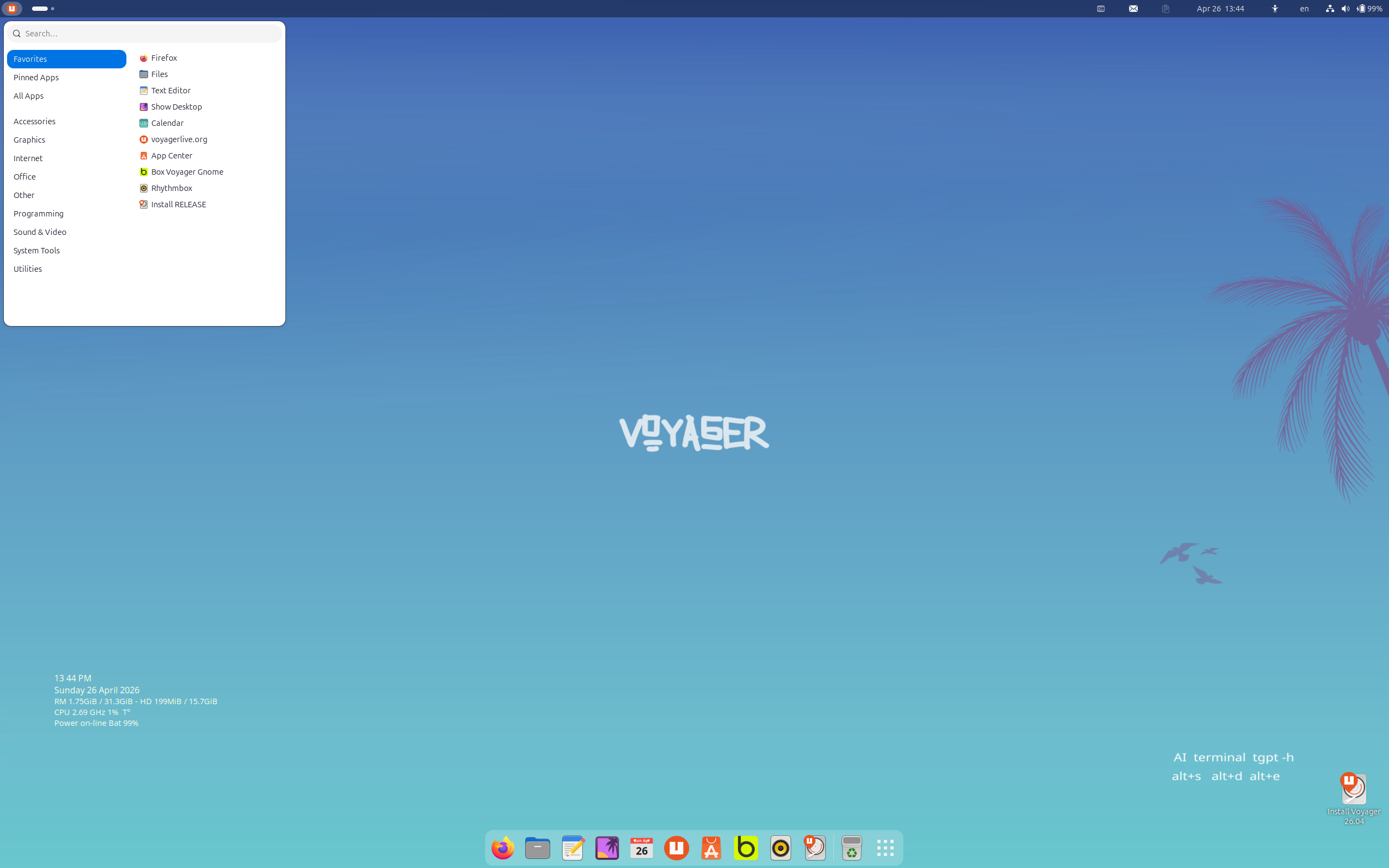
Voyager’s identity is visual. Per DistroWatch, the project’s calling cards are the Avant Window Navigator (AWN) dock-like navigation bar, Conky desktop readouts showing system stats at a glance, and a library of over 300 photographs and animations for desktop backgrounds. The DistroWatch screenshot for 26.04 shows the formula in action: a deep-blue Voyager-branded wallpaper, Conky-style system statistics tucked into the corner, and a bottom dock with Firefox, Files, and an “Install Voyager 26.04” icon.
That design-first instinct is what separates Voyager from a plain respin. Where a stock Ubuntu-family desktop asks you to make it yours, Voyager arrives with an opinion — curated wallpaper, ambient system readouts, a docked launcher row. If you appreciate that kind of out-of-the-box polish, our elementary review looks at another distribution that treats desktop design as a first-class feature, from a very different aesthetic direction.
Under the Hood: Ubuntu Base, Fixed Releases, No Surprises
Below the artwork, Voyager 26.04 is conventional in the best way: a fixed-release Ubuntu-family system with apt package management across deb, flatpak, and snap formats, installed through the familiar Ubiquity installer from a live ISO. It runs on x86_64 with systemd, offers Btrfs, ext4, and XFS journaled file systems, and ships Firefox and LibreOffice as defaults — the full desktop starter kit with nothing exotic in the plumbing.
US Mobile | Plans As Low As $10, Get $30 Instantly
The parallel Debian-based line is where Voyager shows its range. The 13.5 release in the comparison table uses the Calamares installer instead of Ubiquity, keeps GNOME and the apt/deb/flatpak stack, and tracks Debian’s “stable” branch rather than Ubuntu’s calendar — a slower, steadier Voyager for users who want the project’s styling without the six-month Ubuntu cadence. Fixed releases on both lines mean you install a known quantity and upgrade on a schedule, not a stream.
One Project, Several Voyagers: GE, GS, Debian, and an AI Experiment
DistroWatch notes that the project develops several editions beyond the flagship: a “GE” edition built around GNOME Shell, a “GS” variant aimed at gamers, and the separately-maintained Debian-stable flavour. That multi-edition structure explains the GNOME/Xfce duality in the listing — Voyager is less a single desktop than a small family of them, all sharing the project’s visual DNA.
AWS Alternative - Digital Ocean
The quirkiest detail is the Large Language Model category. DistroWatch’s summary records a 2023 headline about Voyager testing a ChatGPT edition, and the 26.04 screenshot itself hints at the experiment continuing — a terminal AI helper (“AI terminal tgpt”) is visible right on the desktop. Few desktop distributions are flirting with on-desk AI tooling this openly; Voyager appears to be using the live medium as a laboratory. If a polished, mainstream Ubuntu-based desktop is more your speed, our Linux Mint review covers the most popular expression of that idea — Voyager is the artsier, more experimental cousin.
Who Should Try Voyager Live?
- Style-conscious users who want a GNOME desktop that looks finished the moment the live ISO boots.
- Ubuntu-family users who like fixed releases, apt, and the Ubiquity installer but want more visual personality than stock.
- Live-medium fans who test-drive distributions before committing — Voyager is built for exactly that workflow.
- Debian-leaning users who want Voyager’s styling on Debian’s “stable” base via the 13.x line.
- French-speaking users: this is a French-origin project, and the listing marks it fully multilingual.
- AI-curious tinkerers intrigued by a desktop distro openly experimenting with terminal-based LLM tooling.
- Newcomers who want a free, complete desktop — Firefox, LibreOffice, and a guided installer included.
Final Thoughts
Voyager Live 26.04 is a free, fixed-release, French-origin desktop distribution based on Debian and Xubuntu, shipping a styled GNOME desktop with apt package management (deb, flatpak, snap), the Ubiquity installer, systemd, and Firefox plus LibreOffice out of the box — with a Debian-based 13.x sibling, gamer and GNOME editions, and an AI experiment running alongside. With a DistroWatch popularity rank of 57 and a 7.8/10 visitor rating across 27 reviews, it is a well-liked niche pick for users who believe a Linux desktop should be beautiful on first boot.
Bottom line: if you want an Ubuntu-family desktop with genuine visual flair and a taste for experimentation, Voyager Live 26.04 deserves a live-USB slot — and if you would rather have the polished-but-mainstream take on the same base, our Linux Mint review is the natural comparison.
Source: DistroWatch Voyager Live page, release 26.04, dated April 24, 2026.