PrismLinux Review
PrismLinux 2026.08.15: A Minimalist Arch Build That Lets You Choose the Desktop at Install Time
A Ukraine-origin Arch derivative whose live image boots into the River Wayland compositor, ships an LTS kernel tuned for speed with pre-configured TLP, and asks you which of five desktop environments you want before it installs anything. Here is what the DistroWatch listing says about PrismLinux 2026.08.15.
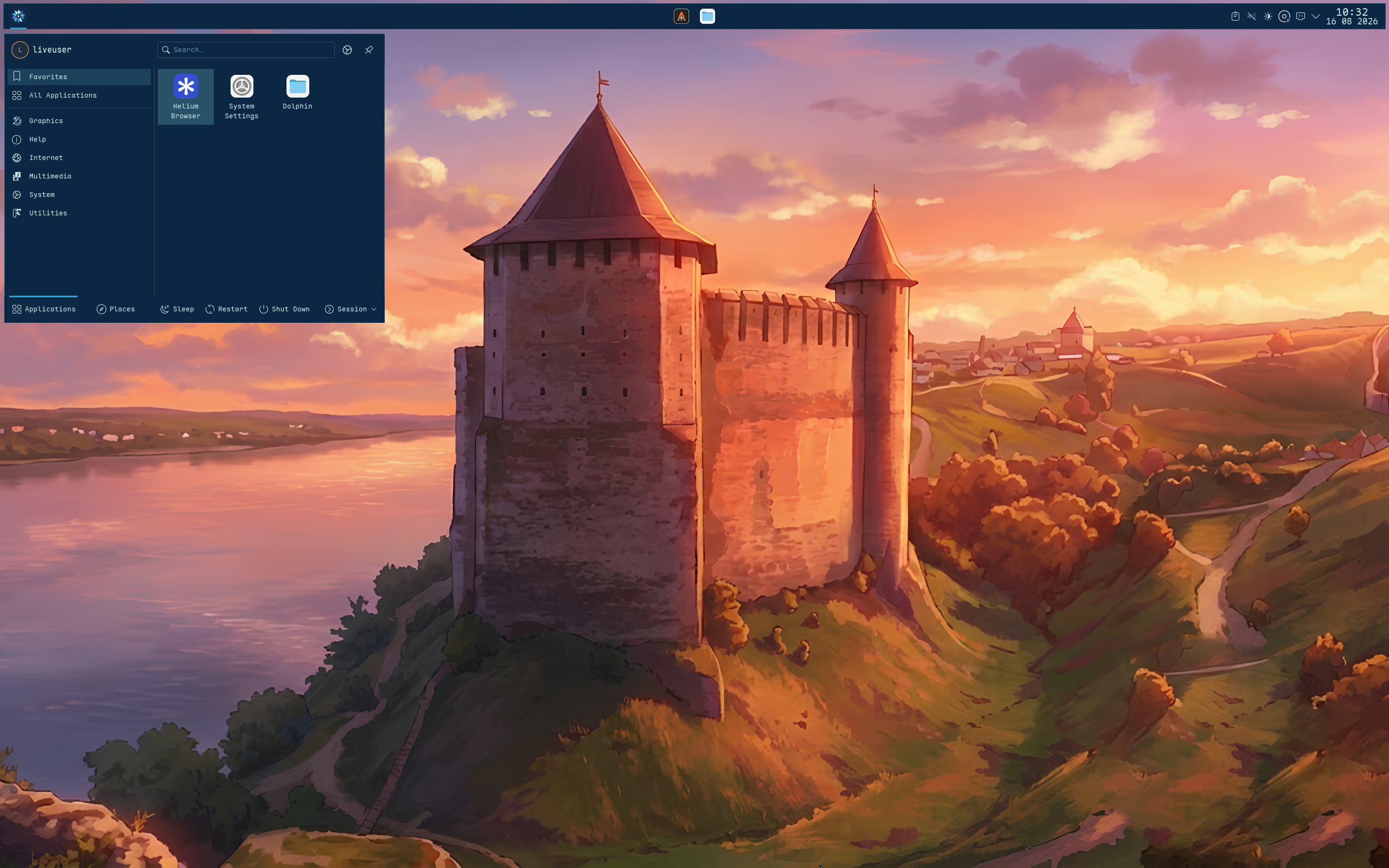
PrismLinux describes itself on DistroWatch in refreshingly plain terms: “a minimalist distribution based on Arch Linux.” The minimalist claim is about the starting point, not the destination — the live image boots into the River Wayland compositor, a lightweight tiling environment, and launches a custom system installer that offers “several popular desktop options available for installation, including KDE Plasma, GNOME, COSMIC and Cinnamon, as well as a customized Niri Wayland compositor.” The idea is that you choose the finished experience up front instead of installing a default desktop and stripping it down afterward.
It is an interesting contrast with our EndeavourOS review: EndeavourOS is also Arch-based and also hands you a desktop sampler, but its approach is a menu of choices with a mostly vanilla install. PrismLinux narrows the menu to five specific environments and pairs each with its own tweaks — a customized Niri rather than stock Niri, for example — so the choice feels curated rather than open-ended.
The release currently listed by DistroWatch is PrismLinux 2026.08.15, released August 15, 2026, with earlier announcements for 2026.05.05 (May 8, 2026) and 2026.03.04 (March 5, 2026) — roughly monthly snapshots of a rolling distribution. It is free to download as an ISO of about 2.6 to 2.7 GB, built for 64-bit x86 systems. On DistroWatch’s popularity chart it sits at rank 97 (about 150 hits per day), with an average visitor rating of 7.8 out of 10 from 9 reviews.
At a Glance
| Feature | What PrismLinux 2026.08.15 Offers |
|---|---|
| Current listed release | PrismLinux 2026.08.15, released August 15, 2026 |
| Distribution base | Arch Linux |
| Release model | Rolling release |
| Default desktop | KDE Plasma (installer also offers GNOME, COSMIC, Cinnamon, and a customized Niri; live image boots into River) |
| Package management | pacman; pkg (Arch) package format |
| Installer | Custom system installer (Crystallize) launched from the live environment |
| Default browser | Helium |
| Kernel | Linux 7.2.8 LTS, compiled with kernel parameters optimised for speed |
| Included power management | Pre-configured TLP utility for extending battery life |
| Supported architecture | x86_64 |
| Init system | systemd |
| Listed journaled file systems | Btrfs, ext4, XFS |
| Typical ISO size | Approximately 2.6 to 2.7 GB |
| Price | Free |
Feature details and version information are based on the DistroWatch PrismLinux listing for release 2026.08.15.
Pick Your Desktop First: River Live, Then Five Doors to Choose From
The live-session decision is the most unusual thing in the listing. Most desktop distributions boot you into the desktop you will end up with; PrismLinux boots you into River, a minimal tiling Wayland compositor, and uses that session only as a launchpad. From there the custom installer presents the real question: which finished environment do you want installed?
The listed options cover most of the mainstream and the avant-garde: KDE Plasma (the feature table’s default desktop), GNOME, COSMIC, Cinnamon, and a customized Niri Wayland compositor. That is a strong spread — the full-featured Plasma and GNOME, the upstart COSMIC, the traditional Cinnamon, and a tiling compositor for the keyboard-driven crowd. Readers of our Omarchy review will recognize the tiling appeal of a Wayland compositor as the default workflow, but PrismLinux doesn’t commit to one — it asks.
There is a quiet logic to it: installing from a lightweight River session means the installer and the live environment stay fast even on modest hardware, and deciding the desktop up front means the installed system doesn’t carry the weight of options you rejected. For newcomers who aren’t sure which desktop suits them, five curated choices is far less paralyzing than Arch’s “assemble everything yourself” — though it is still a commitment made before you’ve tried anything, so do some homework on what each environment feels like.
An LTS Kernel Tuned for Speed, and a Laptop Battery in Mind
PrismLinux makes two performance claims that are specific enough to be interesting. First, the distribution “uses the long-term supported (LTS) Linux kernel compiled with kernel parameters optimised for speed.” That is a deliberate tradeoff — a stability-oriented kernel family, but one the project has compiled with its own tuning for responsiveness. The package table lists Linux 7.2.8 in the 2026.08.15 snapshot, alongside systemd 262, Mesa 26.2.4, glibc 2.44, and NVIDIA driver 615.71.09 — fresh plumbing for a rolling system.
Second, the listing notes a “pre-configured TLP utility for extending battery life,” which quietly reframes the performance story: this is a distro tuned for laptops. Speed-tuning plus battery management is a coherent pair for anyone running a portable machine daily. The angle is different from CachyOS, which also chases performance on Arch but leans on optimized repositories and a polished graphical installer — PrismLinux’s approach is more surgical: one tuned kernel, one tuned power profile, minimalism everywhere else.
Get The Polymarket App - Get $50
Honest Arch Underneath: Pacman, Rolling Snapshots, and Current Software
Under the hood, there is no reinvention: the feature table lists pacman and the pkg package format, a rolling release model, systemd as the init system, and Btrfs, ext4, or XFS for the filesystem. The version snapshots are released roughly monthly (2026.03.04, 2026.05.05, 2026.08.15), but the release model is rolling — install once and update continuously, with the snapshots serving as fresh starting points.
The package versions in the 2026.08.15 snapshot are current across the board: GNOME Shell 51.0, Cinnamon 6.6.9, Firefox 157.0, Chromium 154.0.8037.97, LibreOffice 26.8.1, Thunderbird 157.0.1, VLC 3.0.24, and flatpak 1.18.4. The default browser is listed as Helium, and no office suite is bundled by default — you add what you need. The KDE Plasma default also makes our KDE neon review a useful companion read if you want to compare what Plasma looks like in a distro built around it versus one that merely offers it.
One honest caveat from the listing’s own visitor feedback: the most recent reader review (rated 8/10, from Ukraine) calls it “not bad for one man distro,” praising the Arch base but flagging a buggy installer experience in a VM and difficulty finding the project’s source code. Small-team projects come with small-team tradeoffs — worth knowing, and worth testing the live image before you commit.
Who Should Try PrismLinux?
PrismLinux is for people who like the Arch ecosystem but want somebody to have made the first few decisions:
- Arch-curious users who want pacman, the AUR’s orbit, and a rolling model without a manual installation — a curated on-ramp between vanilla Arch and the big derivatives.
- Laptop users drawn to the combination of a speed-tuned LTS kernel and pre-configured TLP battery management.
- Desktop undecideds who know they want something finished but can’t choose between KDE Plasma, GNOME, COSMIC, Cinnamon, or a tiling Niri setup — the installer lays all five out.
- Tiling-compositor experimenters who want River on the live image and Niri as a first-class installed option without assembling either from scratch.
- Minimalists who prefer to start small and add software deliberately — no bundled office suite, no kitchen-sink defaults.
Conversely, anyone who wants a single polished default desktop with no decisions, or a fixed long-support release cycle, will be happier elsewhere — and the small-team nature means you should approach it with a tester’s curiosity rather than production-system expectations.
Final Thoughts
PrismLinux is a study in front-loaded choice: a minimalist live image, one speed-tuned LTS kernel, honest Arch rolling underneath, and a single question asked at install time — which desktop do you actually want? It is a narrower, more curated cousin of the Arch-derivative family that EndeavourOS and CachyOS anchor: less “here is everything,” more “here are the five things we think are good, pick one.”
The DistroWatch numbers are modest — rank 97, a 7.8/10 visitor rating across 9 reviews — but the project is young, releases monthly snapshots, and the reader feedback so far reads like early-adopter goodwill with honest caveats. If you want Arch without the install gauntlet and you know which desktop you want (or you like the idea of being asked), the 2.7 GB download is a low-stakes experiment worth trying from a USB stick first.
Source: DistroWatch PrismLinux page (https://distrowatch.com/table.php?distribution=prismlinux). Information cited in this post reflects the DistroWatch listing and release information for PrismLinux 2026.08.15, released August 15, 2026.