Lite Review
Linux Lite 8.0: The Lightweight Xfce Distro That Welcomes Windows Refugees
Not everyone arrives at Linux looking for an adventure. Many people land there because an old laptop is gasping for air, or because a Windows update went one step too far. Linux Lite has been courting exactly that audience for years, and its latest milestone — Linux Lite 8.0, released June 1, 2026, according to its DistroWatch listing — doubles down on the pitch: a fast, friendly, Ubuntu-LTS-powered desktop built on the lightweight Xfce environment, aimed squarely at Windows users making the switch.
Where our Linux Mint review covers a distro that wins beginners over with polish, Linux Lite wins them over with restraint. It boots quickly on modest hardware, keeps the interface familiar, and ships with the everyday software already in place so newcomers don’t have to hunt for it. It is the kind of distribution someone installs for a parent, a grandparent, or a friend who just wants their computer to work.
At a Glance
| Latest Release | Linux Lite 8.0 (June 1, 2026, per DistroWatch) |
| Based On | Debian, Ubuntu (LTS) |
| Origin | New Zealand |
| Default Desktop | Xfce |
| Architecture | x86_64 |
| Target Audience | Beginners, Desktop, Live Medium |
| Status | Active |
| DistroWatch Popularity Rank | 35 (299 hits per day) |
The Xfce Difference: Light, Fast, and Familiar
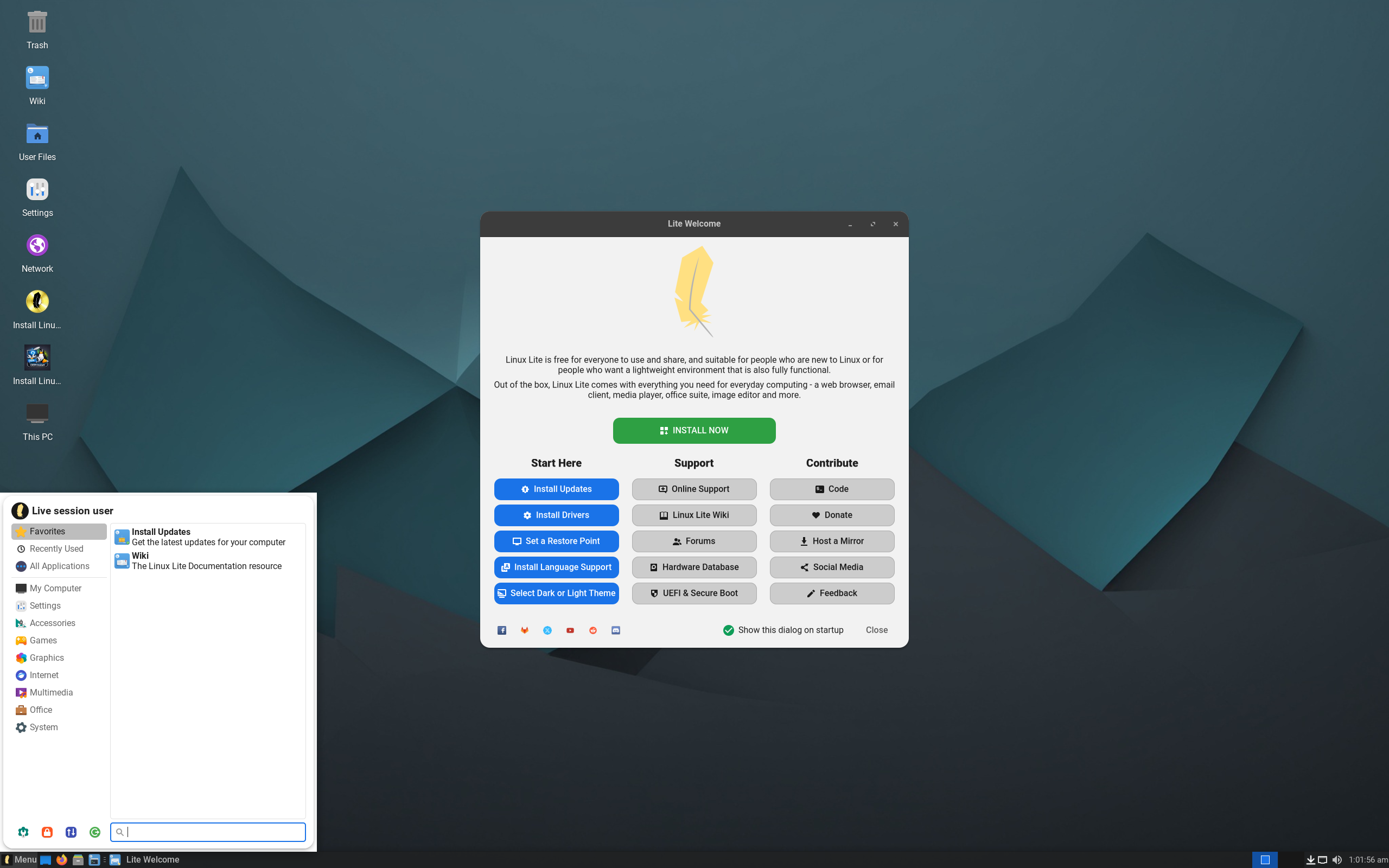
The defining choice in Linux Lite is its desktop: Xfce. Where heavier environments strain older machines, Xfce sips resources and stays responsive on hardware that has been collecting dust in a closet. The layout is deliberately Windows-like — a taskbar, a system tray, a start-style menu — which cuts the learning curve to almost nothing for someone arriving from Windows 10 or 11.
That lightness is not just about nostalgia hardware, though. Running snappily on modest specs also means the system stays fast on modern machines, where every cycle saved is one available for actual work. For users who tried heavier beginner distros and found them sluggish on their laptop, Lite’s Xfce desktop is the answer.
Built on Ubuntu LTS, With Debian Underneath
Linux Lite’s DistroWatch listing shows its foundation as Debian, via Ubuntu’s long-term support (LTS) releases. That matters more than it sounds: an LTS base means years of security updates, a vast software repository, and a torrent of community answers to every question a beginner might Google. The Ubuntu connection also gives Lite access to the same enormous pool of third-party software and hardware driver support.
Distro fans who prefer a more direct Debian lineage might look at another Debian-based option like MX Linux, which takes a different, more tinkerer-oriented route. Linux Lite sits at the opposite end of the spectrum: Debian and Ubuntu are the engine room, and the user never has to see them.
Software for Real Life, Ready on Day One
Per its DistroWatch description, Linux Lite “aims to provide a complete set of applications to assist users with their everyday computing needs, including a full office suite, media players and other essential daily software.” That curation is the distro’s quiet superpower. Open the box and you have documents, spreadsheets, presentations, a web browser, and media playback covered — no terminal, no package manager tour, no twenty-minute setup ritual.
This is the same reason many of us keep recommending beginner distros to family members: the less the new user has to install and configure, the sooner they feel at home. Linux Lite understands that the best Linux introduction is the one where nothing is missing on the first boot.
A Gentle On-Ramp for Windows Users
The DistroWatch listing is explicit that Linux Lite “primarily targets Windows users,” and the whole experience reflects it. Familiar menus, straightforward settings, and a desktop that behaves the way a Windows user expects. Where Zorin pursues a similar audience with a highly polished, Windows-like finish, Linux Lite pursues it with simplicity and speed on weaker hardware.
Get The Polymarket App - Get $50
There is no account system to opt into, no telemetry maze, no forced update restart. For someone whose main complaint is that their computer keeps getting in the way, that quietness is the feature.
Who Should Try Linux Lite?
- Windows users switching to Linux — a familiar layout and ready-to-go apps soften the landing.
- Anyone reviving an old laptop — Xfce breathes new life into hardware that struggles with heavier desktops.
- People setting up a computer for a relative — the “it just works, and nothing is missing” distro.
- Beginners who found other distros sluggish or overwhelming — Lite strips the experience back to speed and simplicity.
Final Thoughts
Linux Lite does not try to be the most exciting distribution on DistroWatch — and that is precisely its value. It is a focused, lightweight, beginner-first desktop built on the rock-solid Ubuntu LTS base, refined release after release for the people Linux often leaves behind: Windows switchers, old-hardware owners, and total newcomers. If you want flashy, our Linux Mint review covers a more polished mainstream alternative; if you want lean, fast, and welcoming, Linux Lite 8.0 deserves a look.
Source: Linux Lite 8.0 facts and release date from its DistroWatch listing at distrowatch.com/table.php?distribution=lites.