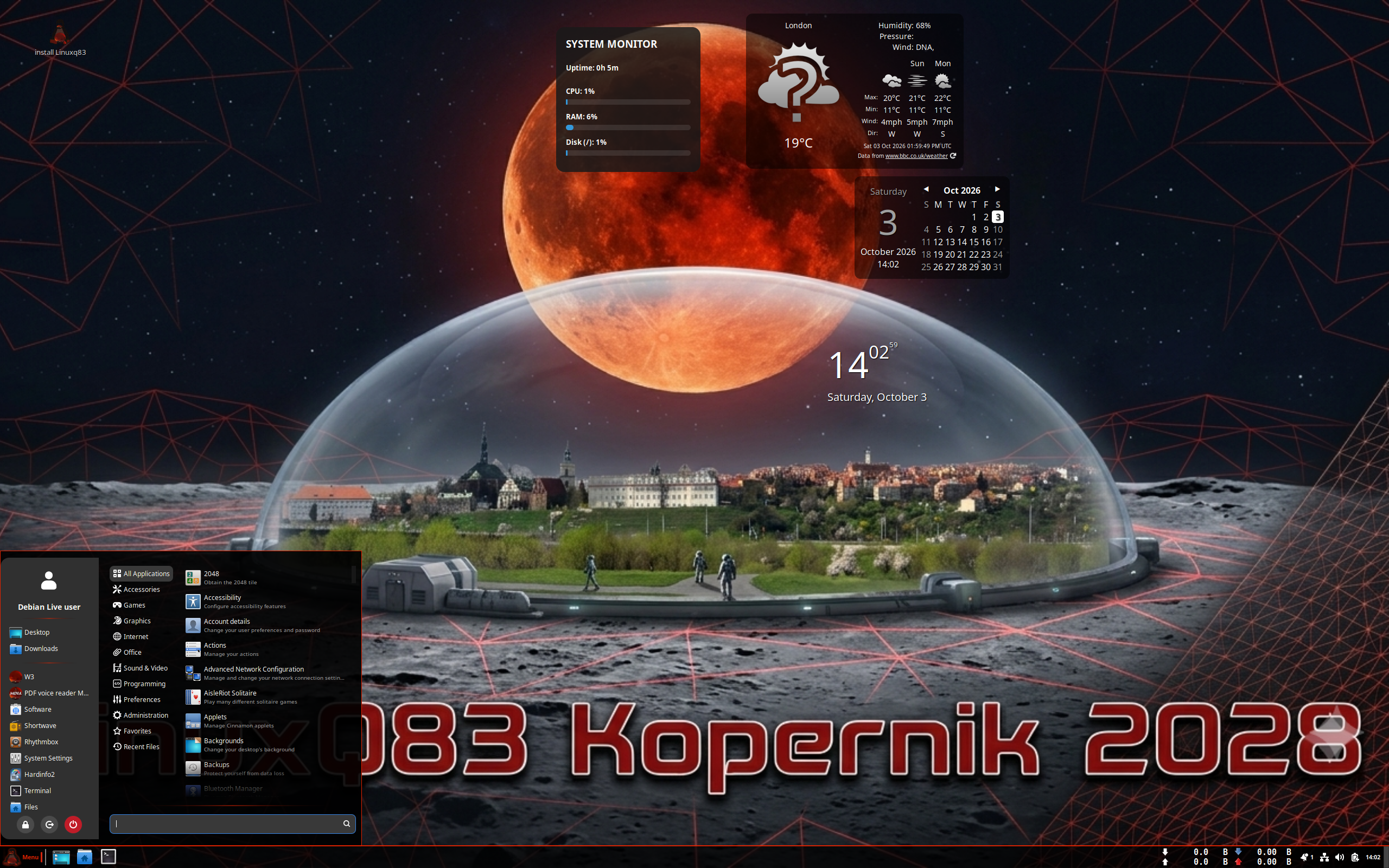
Linux Q83 Review
Linux Q83 2028.06 “Kopernik”: Debian Stable with Your Choice of Cinnamon or COSMIC
Some distributions ask you to pick a side: traditional or modern, lightweight or full-featured. Linux Q83, a desktop distribution from Poland, would rather let you choose at download time. According to its DistroWatch listing, Linux Q83 is built on Debian’s “Stable” branch (the listing also credits Debian’s “Testing” branch), and the current release tracked by DistroWatch is version 2028.06, codenamed “Kopernik”, released on 2 October 2026. It is a free, SourceForge-hosted project, and it is quietly one of the more interesting Debian derivatives to appear in a while.
What makes Linux Q83 stand out is the combination it offers. You get the conservative, well-tested foundation of Debian itself, a graphical Calamares installer instead of Debian’s more austere setup routine, and a choice between two very different desktops: the familiar Cinnamon and System76’s new Rust-written COSMIC. On top of that, it runs not just on ordinary x86_64 desktops and workstations, but also on ARM hardware — Raspberry Pi boards and the Radxa Orion O6 single-board computer. It even ships its own home-grown web browser, a lightweight tool called W3.
At a Glance
| Latest Release | 2028.06 “Kopernik” (2 October 2026) |
| Base | Debian (Stable) |
| Origin | Poland |
| Desktops | Cinnamon (default), COSMIC |
| Architectures | x86_64, aarch64 |
| Installer | Calamares (live ISO, approx. 4,300–4,400 MB) |
| Package Management | APT — deb, Flatpak and Snap formats |
| Release Model | Fixed |
| Init System | systemd |
| File Systems | Btrfs, ext4, XFS |
| Default Browsers | Firefox ESR, W3 |
| Office Suite | LibreOffice |
| Price | Free |
| DistroWatch Popularity | 79 (166 hits per day) |
| Visitor Rating | Not yet rated on DistroWatch |
Two Desktops, Two Very Different Ideas
The headline choice in Linux Q83 is the desktop. The default edition uses Cinnamon — described by DistroWatch as a fork of GNOME created by Linux Mint — in version 6.6.9 for the “Kopernik” release. If you like the classic layout of panels, a start-style menu and system tray applets that our Linux Mint review praised, the Cinnamon edition of Q83 will feel instantly familiar, just with Debian Stable underneath instead of an Ubuntu base.
Try YouTube TV | Special Discount
The alternative edition swaps Cinnamon for COSMIC, the modern desktop environment written in the Rust programming language and developed by System76 — the same desktop that headlines Pop!_OS. The pairing is unusual: COSMIC is normally tied to Pop!_OS’s Ubuntu-based stack, so seeing it offered on a Debian Stable foundation, with a fixed release model, gives curious users a genuinely different way to try it. Few distributions offer both a traditional and a next-generation desktop from the same download page, and fewer still do it on Debian.
Free Credit Score Monitoring At Sofi
Debian Under the Hood, Without the Debian Homework
Underneath, Linux Q83 keeps things reassuringly conventional. It uses the systemd init system, supports the Btrfs, ext4 and XFS journaled file systems, and manages software with APT — Debian’s package manager — while also supporting Flatpak and Snap packages alongside native deb files. The “Kopernik” release ships Linux kernel 7.1.8, and because the release model is fixed rather than rolling, updates arrive as new numbered releases instead of a constant stream of changes. For anyone who finds plain Debian powerful but a little too hands-on, the Calamares graphical installer and live-medium format lower the barrier considerably: you boot the ISO, try the desktop, and install only when you are ready.
From Workstations to Raspberry Pi
DistroWatch categorises Linux Q83 as a Desktop, Live Medium and Raspberry Pi distribution, and the architecture list backs that up: builds exist for both x86_64 and aarch64. That means the same distribution can run on a standard desktop or workstation and on small ARM boards such as the Raspberry Pi and the Radxa Orion O6. It is a multilingual release, too, which fits its European origin. For tinkerers who like consistency across their machines, running one Debian-based system on both the desk and the Pi is an appealing proposition.
Its Own Browser: W3
Perhaps the most distinctive touch is W3, Linux Q83’s own web browser, which DistroWatch describes as lightweight and resource-efficient. It is listed as a default browser alongside Firefox ESR, so you are not forced to use it — but shipping a home-grown browser in 2026 is a statement of intent from a small project. Rounding out the defaults, LibreOffice covers office work, so the installed system is usable for everyday tasks straight away.
Who Should Try Linux Q83?
- Debian fans who want an easier on-ramp — Calamares and a live desktop make Q83 simpler to install than stock Debian, while keeping Debian Stable underneath.
- Cinnamon lovers — if you enjoyed Mint’s take on the Cinnamon desktop but prefer a Debian base, Q83 is a natural experiment; another Debian-based option, MX Linux, is worth comparing it against.
- The COSMIC-curious — try System76’s Rust desktop on a Debian foundation rather than Pop!_OS’s Ubuntu base.
- Raspberry Pi and single-board computer owners — official aarch64 builds cover the Raspberry Pi and Radxa Orion O6.
- Users of modest hardware — the lightweight W3 browser and live-medium design keep the system approachable.
Final Thoughts
Linux Q83 is a small Polish project with an unusually broad brief: Debian Stable reliability, a choice of Cinnamon or COSMIC, x86_64 and ARM builds, and even its own browser. It currently sits at number 79 in DistroWatch’s popularity rankings with 166 hits per day and has not yet collected a visitor rating, so it is still early days — but as a project it punches well above its weight. If your perfect distribution sounds like “Debian, but friendlier, with a modern desktop option”, the 2028.06 “Kopernik” release deserves a place on a spare USB stick.
Source: DistroWatch’s Linux Q83 listing, covering the 2028.06 “Kopernik” release of 2 October 2026.