deepin Review
deepin 25.2: A Design-First Debian Desktop From China
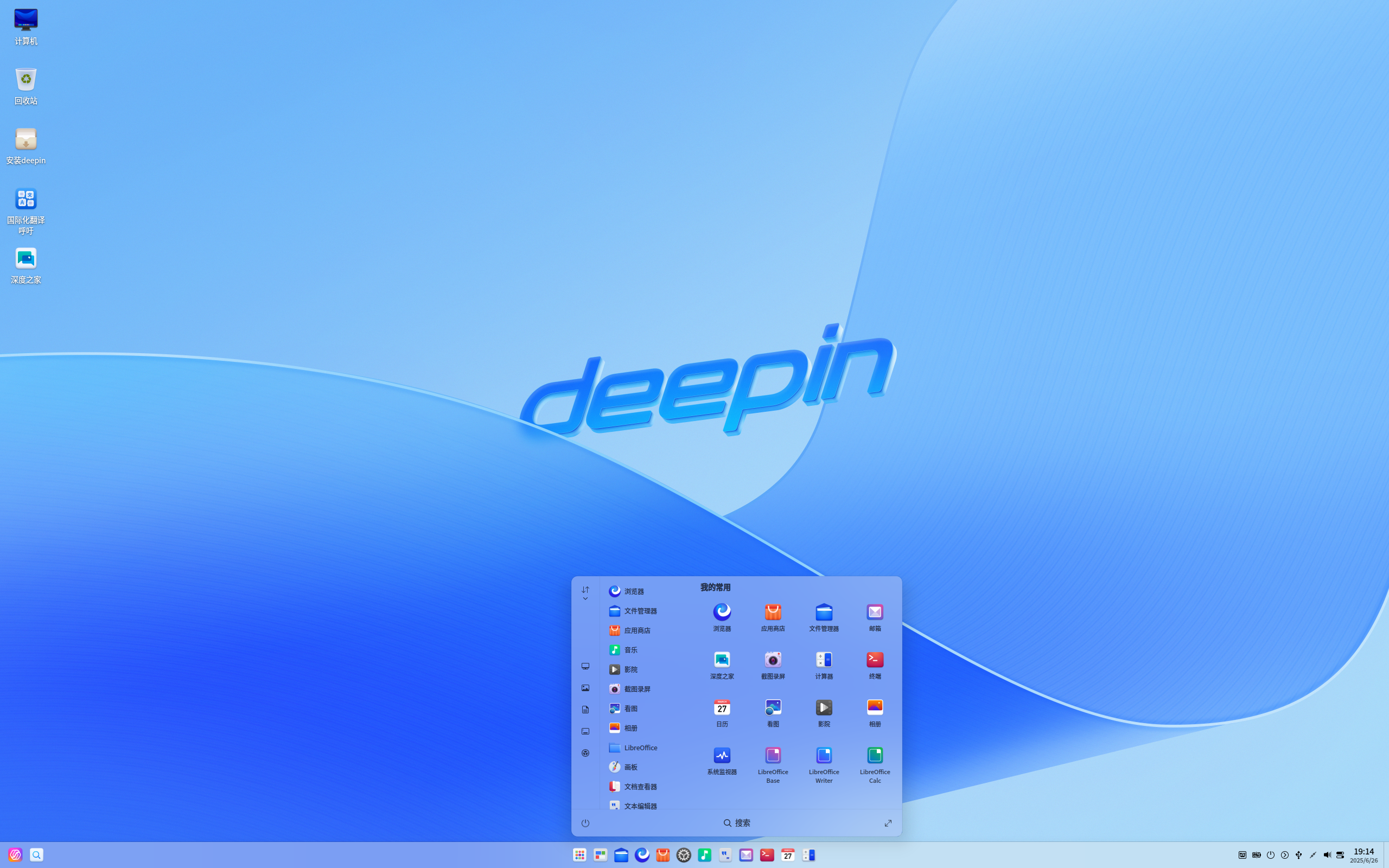
Most Linux distributions borrow a desktop environment from someone else and then put their own stamp on it. deepin went the harder route: it built its own. The result is one of the most visually distinctive desktops in the Linux world — a polished, cohesive environment that aims to make Linux feel as considered as a commercial operating system.
The latest release listed by DistroWatch is deepin 25.2.0, announced on July 8, 2026. It continues the project’s long-running mission: an elegant, user-friendly and reliable operating system that, in DistroWatch’s words, “can be a good Windows alternative for office and home use.”
deepin has deep roots. It has previously been known as Linux Deepin, Deepin, and, in its earliest days, Hiweed GNU/Linux. It was Ubuntu-based until version 15, released in late 2015, and has been built on a Debian foundation ever since — the same rock-solid base that powers our Debian review subject. DistroWatch lists the project’s origin as China, and deepin remains one of the most prominent Chinese distributions in the Linux ecosystem.
deepin 25.2 at a Glance
| Latest release | deepin 25.2.0 (announced July 8, 2026) |
| Based on | Debian (Ubuntu-based until version 15, late 2015) |
| Origin | China |
| Status | Active |
| Cost | Free |
| Installation | Graphical deepin installer; free ISO download (5,200–6,700 MB) |
| Default desktop | Deepin (DDE — Deepin Desktop Environment) |
| Release model | Fixed |
| Package format / management | deb / apt |
| Init system | systemd |
| Journaled file systems | Btrfs, ext4, JFS, ReiserFS, XFS |
| Architectures | aarch64, loongarch64, riscv64, x86_64 |
| DistroWatch popularity rank | 61 (200 hits per day) |
| DistroWatch visitor rating | 8.1 |
Table note: All facts in this review are taken from deepin’s listing at DistroWatch, and release details refer to the deepin 25.2.0 release of July 8, 2026.
DDE: A Desktop Built In-House, Not Borrowed
The centerpiece of deepin is DDE, the Deepin Desktop Environment — a home-grown, Qt-based desktop created by the deepin team itself rather than adapted from GNOME, KDE, or Xfce. DistroWatch’s description highlights that deepin “focuses much of its attention on intuitive design,” and DDE is where that focus shows: a refined taskbar and launcher, a polished control center, and a consistent visual language across the whole system.
The design-first philosophy echoes projects like elementary OS, which we reviewed separately — but deepin’s approach is distinctly its own, with a modern, dock-centric look that will feel familiar to anyone coming from Windows or macOS.
deepin also ships its own set of tailored applications. DistroWatch names the Deepin Software Centre, DMusic, and DPlayer as examples of home-grown software “tailored to the average user” — music, video, and app management handled with the same design care as the desktop itself.
Debian Foundations, Fixed and Familiar
Underneath the gloss, deepin is practical Linux. The Debian base brings the familiar deb package format and apt package management, so installing software works exactly the way millions of Debian and Ubuntu users already expect. The release model is fixed, which means versioned releases on a predictable schedule rather than a rolling stream of updates.
System internals are conventional in the best sense: systemd as the init system, and support for a broad set of journaled file systems — Btrfs, ext4, JFS, ReiserFS, and XFS. DistroWatch lists LibreOffice as the office suite, and the architecture list is unusually broad for a desktop distribution: x86_64 alongside aarch64, loongarch64, and riscv64, reflecting the project’s reach into ARM and RISC-V hardware.
If you like the idea of a polished Debian-based desktop but want a different flavor of it, Zorin is another Debian-based option that also targets users switching from Windows — a useful point of comparison before you commit to a download.
Getting It Installed
DistroWatch lists deepin’s installation method as the graphical deepin installer, with a free ISO download weighing in at 5,200–6,700 MB. The distribution is categorized as a desktop and live medium, so you can try the full environment from the installation media before installing anything to disk.
Try YouTube TV | Special Discount
deepin is also genuinely multilingual: DistroWatch lists support for Bulgarian, Czech, German, English, Spanish, Finnish, French, Croatian, Italian, Portuguese, Russian, Swedish, Turkish, and Ukrainian among others — fourteen languages in the listing, which underlines how far the project’s audience extends beyond its Chinese origins.
Who Should Try deepin?
- Windows or macOS users looking for a Linux desktop that feels designed rather than assembled, with a coherent, modern visual style.
- Linux newcomers who want an elegant out-of-the-box experience plus the comfort of familiar Debian-style software management (deb/apt).
- Users who value home-grown, integrated applications — a software center, music player, and video player built to match the desktop.
- Multilingual households and offices: the broad language support makes deepin a practical choice for non-English users.
- The curious: if you’ve tried openKylin, another China-developed distribution, deepin is the natural next comparison — an independent project with a longer history and its own desktop environment.
Final Thoughts
deepin 25.2.0 is a reminder that a Linux distribution can have a genuine design point of view. The combination is unusual: a fully home-grown desktop environment and application suite, built on the dependable Debian base, maintained as an active project from China, and offered as a completely free download. With a DistroWatch visitor rating of 8.1 and a popularity rank of 61, it has clearly earned an audience that appreciates what it is doing.
It is not the distro for tinkerers who want to swap every component — DDE is a take-it-as-a-whole experience. But for anyone who wants Linux to look and feel beautiful on first boot, with solid Debian engineering underneath, deepin deserves a serious look.
For release details, package versions, and the full version history, see the deepin page at DistroWatch.